CLOUD PRINT: Print Directly from Odoo
Print Odoo Reports & Shipping Labels directly — Instantly. Silently. Anywhere.
Send reports and shipping labels to direct print instantly. No downloads. No additional hardware. Just smooth, automated printing.

CLOUD PRINT: Print Directly from Odoo
Print Odoo Reports & Shipping Labels directly — Instantly. Silently. Anywhere.
Send reports and shipping labels to direct print instantly. No downloads. No additional hardware. Just smooth, automated printing.
Odoo 17, 18 & 19 Ready
No IoT Box Required
No PDF Downloads
Works with Community & Enterprise
ZPL & Shipping Labels
Multi-Warehouse Support
Hardware Preset Sync
Zero Customization
Agent Health Audit
Odoo 17, 18 & 19 Ready
No IoT Box Required
No PDF Downloads
ZPL & Shipping Labels
Multi-warehouse Support
Zero Customization
Hardware Preset Sync
Agent Health Audit
Works with Community & Enterprize
Zero Code. No Hardware. Ready in Under 5 Minutes.
No developer. No customization. No IT team required. Install, connect, and start printing — fully automated from day one.
Install the agent, sync your printers, set one rule - done.
Everything works out of the box.
No code. No modules to modify. No Odoo developer needed. Works out of the box on any Odoo instance.
Set your rules once.CloudPrint handles every print job automatically from that point forward. No clicks needed.
Unlike IoT Box or custom integrations — CloudPrint requires no sysadmin, no dedicated hardware, and no ongoing maintenance.
Still Downloading PDFs Every Time You Print from Odoo?
Every print job in Odoo shouldn't require 4 extra clicks. Yet most teams live with exactly that — open report, wait for PDF, download file, open print dialog, confirm. In a warehouse processing 200 orders a day, that's thousands of wasted interactions every week.
Pain points:
Manual print confirmation every single time
Seconds wasted per transaction add up to hours per day
Warehouse teams blocked waiting for label confirmation dialogs
IoT Box requires hardware investment + sysadmin setup
Browser extensions break with Odoo updates
No reliable mobile printing from the field

Everything You Need to Print Smarter from Odoo
A powerful silent printing engine built for Odoo. Eliminate manual steps, automate routing, and print anywhere — instantly.
Silent Direct Printing
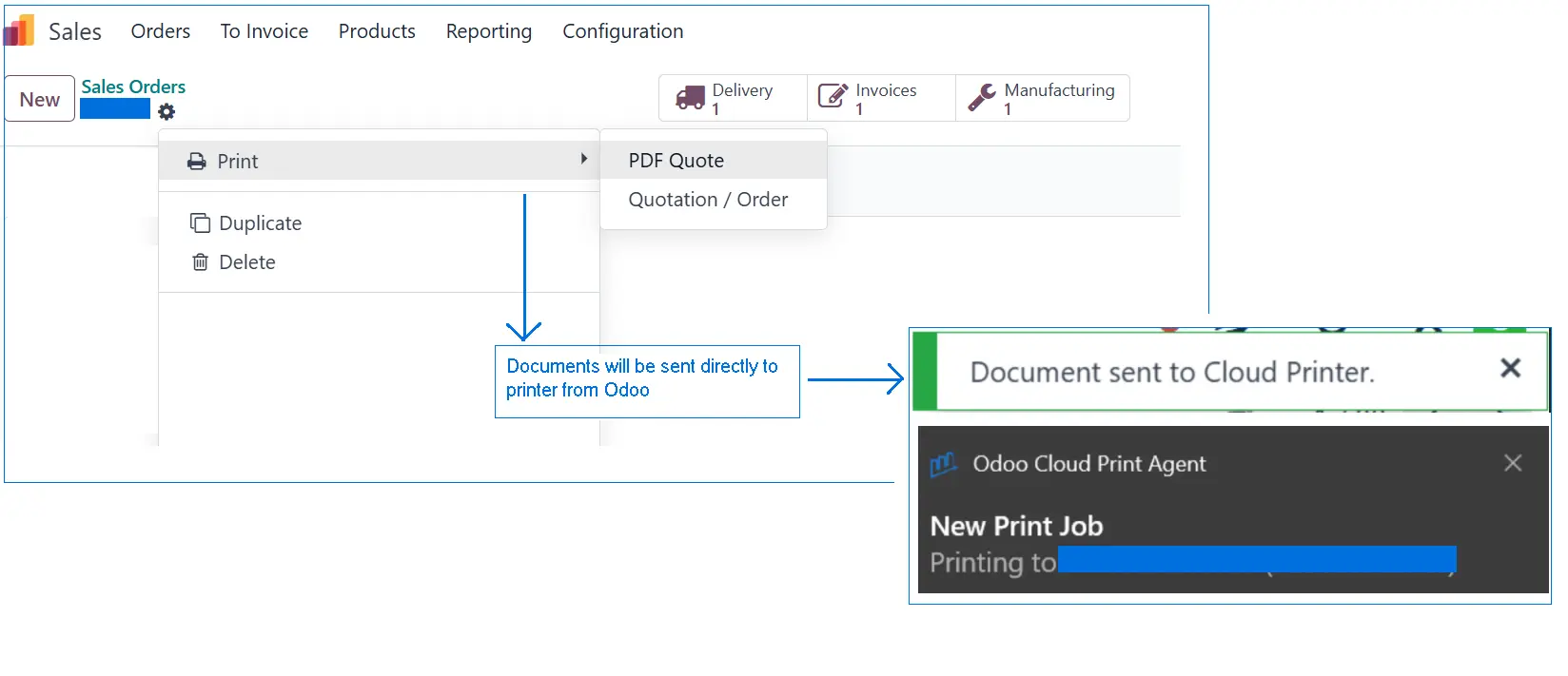
One click in Odoo → document prints. No popup. No dialog.
No download.Your team never has to think about printing again.
Automatic Print Scenarios
Set rules once: print delivery slips when an order is validated, print shipping labels when a picking is confirmed automatically, without any user action.
Intelligent Print Rules
Route different documents to different printers automatically.
Invoices → office printer.
Shipping labels → Zebra thermal printer.
Based on document type, user, location, action or any field.
Works with All Printer Types
USB, Ethernet, WiFi, and Bluetooth printers all supported.
Zebra thermal printers for ZPL labels. Standard A4 printers for reports.
Any brand. Any format.
Remote & Multi-Location Printing
Print to a warehouse printer from your office laptop.
Print across branches without a VPN. Works over the internet.
Mobile Printing
Print shipping labels directly from Odoo mobile app or field devices. No extra setup needed — your mobile team prints from anywhere.
ZPL Shipping Label Support
Print ZPL barcode labels to thermal printers (Zebra, Honeywell, etc.) directly from Odoo without converting to PDF first.
Odoo Community & Enterprise
CloudPrint works on both Odoo Community and Enterprise editions, including self-hosted and Odoo.sh deployments.
User-Based Printer Routing
Assign specific printers to specific users or workstations. When John prints from the warehouse terminal, it goes to the label printer. When Sarah prints from accounts, it routes to the office printer. Automatically, every time.
Hardware Preset Sync
Automatically fetch paper sizes, input trays, and duplexing capabilities directly from Windows drivers into Odoo rules.
Agent Health Audit
Stay proactive with automatic system alerts. Odoo notifies you instantly if an agent loses connectivity or requires an update.
Intelligent Job Recovery
If a label fails to print, Odoo automatically saves a copy so you can easily reprint it anytime—no data lost. You can also view all job details in a centralized reporting dashboard.
How It Works?
Our process in FIVE easy steps
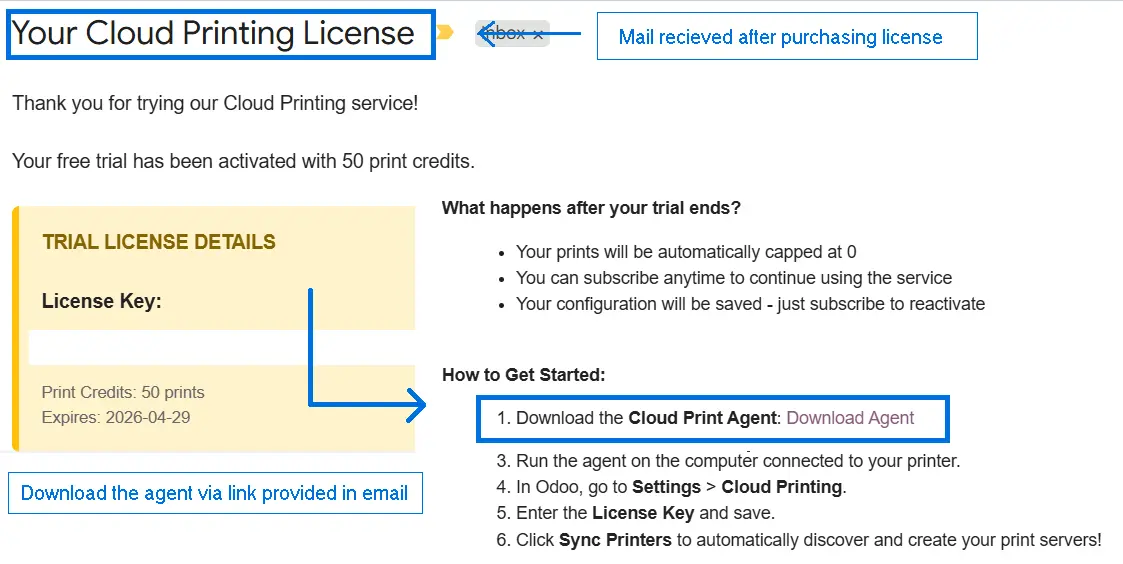
1
Install Agent
Download and install agent on any
Windows PC.
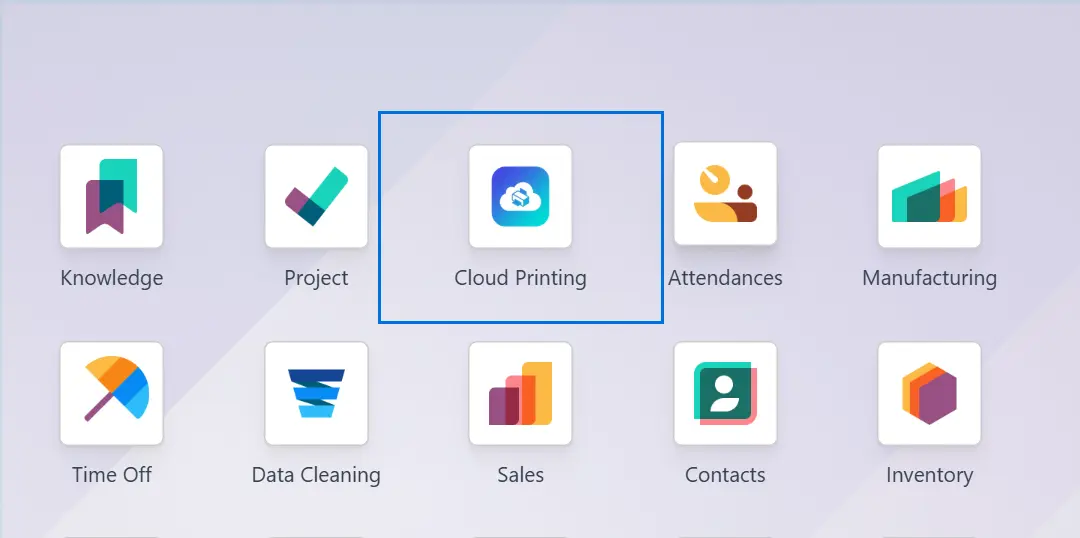
2
Install App in Odoo
Install CloudPrint App in Odoo
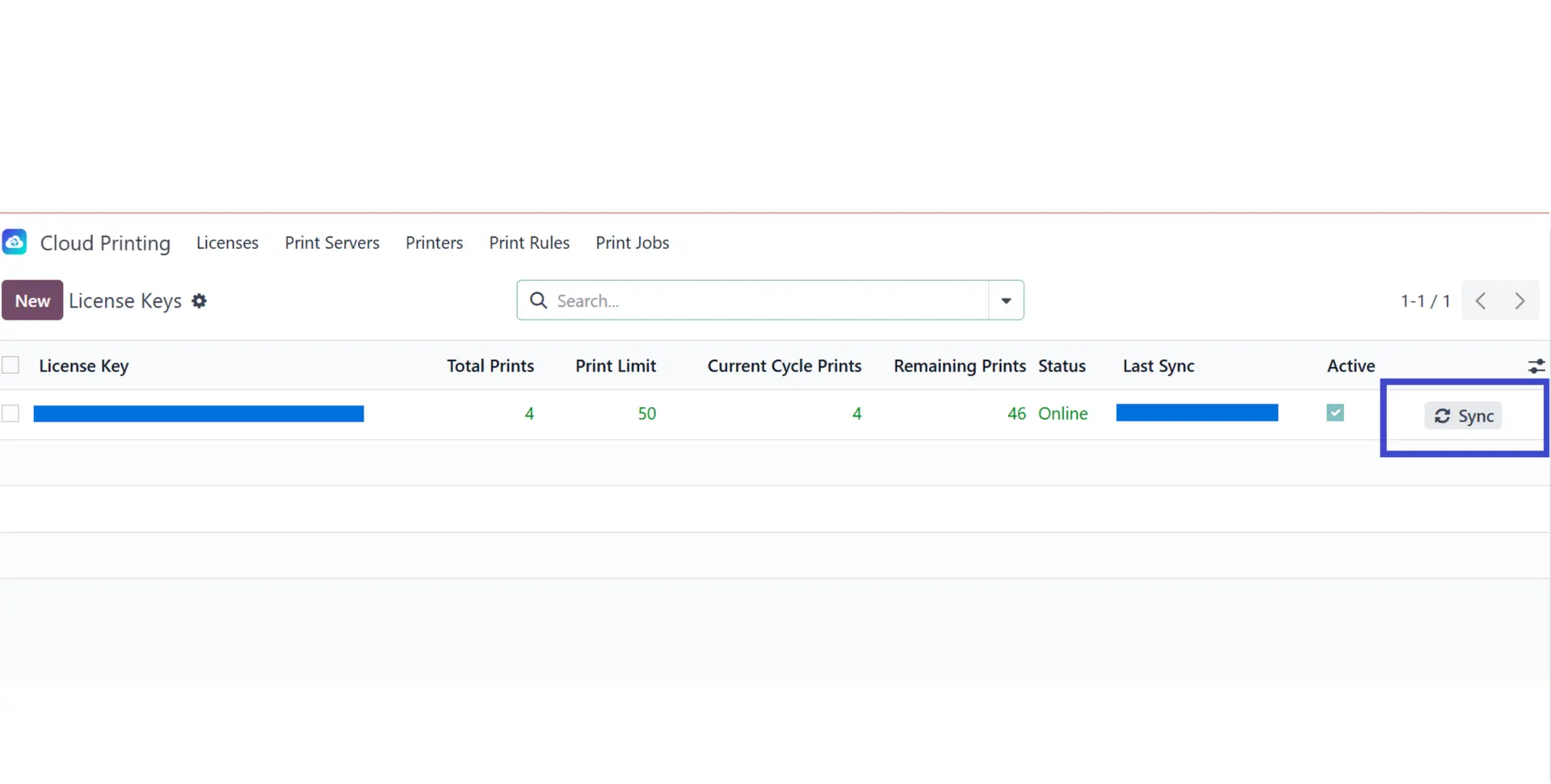
3
Sync Printer
Agent scans and sends printer list to Odoo.
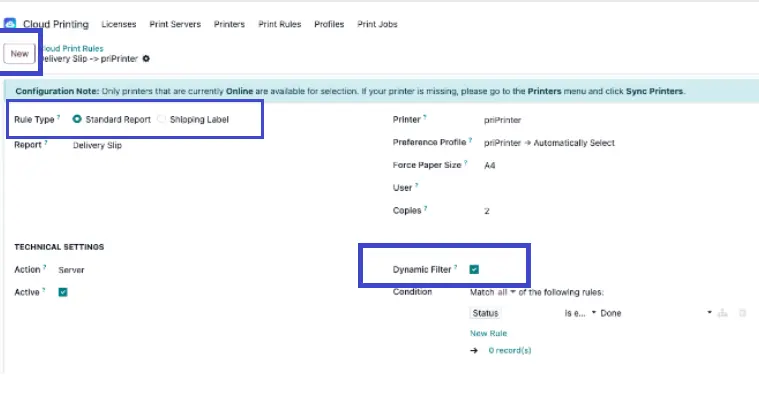
4
Configure Rules
Set rules in Odoo backend.
5
Print Instantly
Any user clicks Print → document prints physically.
That's it! No customization. No code changes to your Odoo instance. CloudPrint works on top of any standard Odoo setup, exactly as it is.
Start Printing Smarter Today
CloudPrint vs Odoo IoT Box — Which Is Right for You?
Odoo Iot Box | Cloud Print | |
Hardware Required | ✅ Physical IoT Box (~€150+) | ❌ None |
Works with Community | ❌ Enterprise only | ✅ Yes |
Works with Odoo.sh | ✅ Yes | ✅ Yes |
Automatic Scenarios | ❌ Limited | ✅ Built-in |
ZPL Thermal Printing | ✅ Yes | ✅ Yes |
Remote/Cloud Printing | ❌ Local network only | ✅ Yes |
Monthly Cost | ~€15/mo per box | From $4.20/mo |
Setup Time | Requires sysadmin | ~5 minutes |
Mobile Printing | ❌ No | ✅ Yes |
Frequently Asked Questions
Direct printing sends Odoo documents straight to your printer without showing a print dialog or saving PDF files. Cloud Print enables direct printing for all Odoo reports and documents.
Cloud Print intercepts Odoo print requests and routes them directly to your configured printers. One click in Odoo = document prints instantly. No dialogs.
Yes. Cloud Print supports direct printing from Odoo mobile and web apps. Your mobile team can print shipping labels directly from the field.
No, you do not need to manually run the Printing Agent after restarting your system. The agent starts automatically in the background.
However, it may take a couple of minutes to fully initialize, depending on your system’s performance. During this time, the agent is starting up and reconnecting to required services.
If it doesn’t become available after a few minutes, you can try restarting the agent manually.
Still Need Help Setting Up CloudPrint?
If you'd rather skip the trial-and-error, our team can handle the complete setup for you.
From installation to printer configuration and workflow rules — we make sure everything works exactly as you need from day one.
Whether it's a simple setup or a complex multi-location environment, our Odoo experts will get you up and running quickly and correctly.
Still Need Help Setting Up CloudPrint?
If you'd rather skip the trial-and-error, our team can handle the complete setup for you.
From installation to printer configuration and workflow rules — we make sure everything works exactly as you need from day one.
Whether it's a simple setup or a complex multi-location environment, our Odoo experts will get you up and running quickly and correctly.
Book Installation Service